Schema Explorer
See your whole database at once. The schema explorer puts all your table definitions on a new page and links them, so you can visually follow your references across tables.
Run View schema from the command palette (P) and Peek introspects the active connection
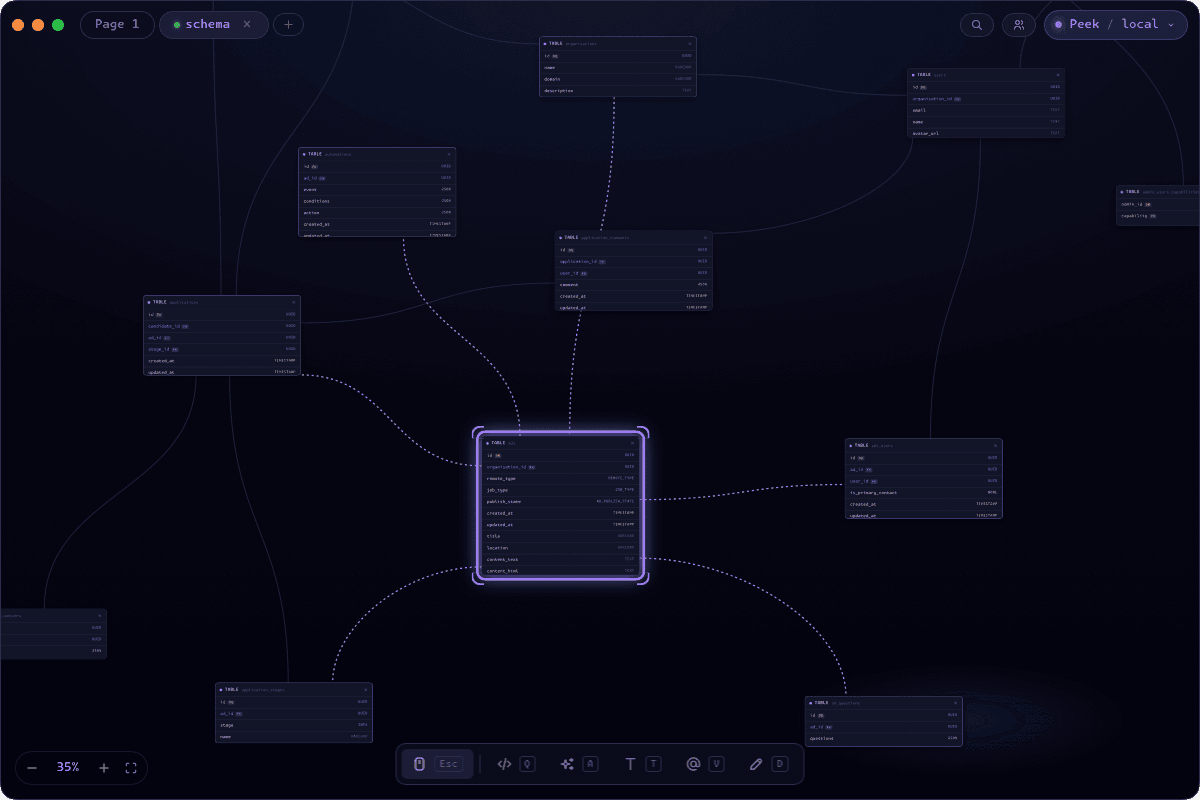
Like any other page
Peek opens up a new, dedicated, schema page for you, and drops the graph there. Meaning you can keep working from there, place query or ai nodes. Or just use the draw tool to annotate your schema.
Keys and types at a glance
Every column carries its type, colour-coded by family - numbers, text, booleans, dates and times, JSON, UUIDs, and binary each read differently - so the makeup of a table is obvious without squinting at varchar versus int8.
Peek tags primary keys with a PK badge and foreign keys with an FKbadge, inferring them from the database's declared constraints and from common conventions like an id column or a trailing _id. The keys that stitch your tables together are the first thing you see.
Follow the relationships
Foreign-key relationships are drawn as edges between tables, derived straight from the schema's references - so the lines always reflect the real constraints rather than anything you wired by hand. Self-references and duplicates are folded away to keep the diagram clean.
Select a table and its connections light up: the edges leaving and entering it glow, and the tables on the other end are highlighted, so you can trace what a given table touches without losing it in the tangle.
Jump to any table
On a large schema the command palette becomes a table of contents. While the schema page is open, every table shows up by name - search for one, hit Enter, and Peek selects it and flies the camera straight to it. Finding orders in a hundred tables is two keystrokes, not a scroll hunt.